לוח חיLuach Chai

הלוח שמתחזק
את עצמו

The shul board that
runs itself

כל מה שנובע מהתאריך — זמנים, פרשה, חת״ת ורמב״ם, יארצייטים, מסכי שבת ומועדים — מתעדכן לבד. את המניינים, השיעורים וההודעות שלכם אתם כותבים מהטלפון, ורואים על המסך תוך דקה.

Everything that follows from the date — zmanim, parsha, Chitas and Rambam, yahrzeits, the Shabbos and Yom Tov screens — updates itself. Your minyanim, shiurim and announcements you write from your phone, and they are on the wall within a minute.

$180 התקנהsetup · $49 לחודשa month

בלי פרסומות. אף פעם. המסך שייך לבית הכנסת, ואף אחד אחר לא קונה עליו מקום. No ads. Not ever. The screen belongs to the shul, and nobody else buys space on it.

The Luach Chai board on the wall at Moshiach Center 770, Lauderhill, Florida. לחצו לצפייה בלוח חי ↗Open the live board ↗

מה מוצג על המסך

What's on the screen

המסכים מתחלפים לפי היום. כל מסך מופיע רק כשיש לו מה להראות — שבת ומועדים רק בשבת ובחג, שבת מברכים רק בשבת מברכים, הודעות רק כשיש הודעה. אתם לא צריכים להחליף כלום.

The screens change with the day. Each appears only when it has something to say — Shabbos and Yom Tov only then, Shabbos Mevorchim only on Shabbos Mevorchim, announcements only when there is one. You never switch anything over.

זמניםZmanim

זמני היום

Halachic times

שלושה עשר זמנים, לפי שיטת אדמו״ר הזקן או לפי הגר״א — תלוי בנוסח בית הכנסת.

Thirteen zmanim, by the Baal HaTanya or by the Gr"a — whichever your shul davens by.

שיעוריםLearning

חת״ת ורמב״ם

Chitas & Rambam

חומש, תהלים ותניא, ושני מחזורי הרמב״ם — ג׳ פרקים ופרק אחד — באותה שורה.

Chumash, Tehillim and Tanya, with both Rambam cycles — three chapters and one — on the same row.

יומיDaily

היום יום ושיעור תניא

Hayom Yom & daily Tanya

הטקסט המלא של היום יום ושל שיעור התניא, לכל ימות השנה, בלי חיבור לאינטרנט.

The full text of both, for every day of the year, held on the board — no internet needed.

שבתShabbos

מפטיר והפטרה

Maftir & Haftarah

לפי ספר המנהגים לנוסח חב״ד, או לפי נוסח אשכנז — כולל שבתות מיוחדות ושבת מברכים.

Per Sefer HaMinhagim for Chabad, or the Ashkenazi list — including the special Shabbosos and Shabbos Mevorchim.

הקהילהCommunity

יארצייטים וימי הולדת

Yahrzeits & birthdays

מתוך רשימת הקהילה, לפי התאריך העברי. ימי הולדת השבוע במסך נפרד.

From your community list, by the Hebrew date. This week's birthdays get a screen of their own.

פליירPoster

המודעה שכבר עיצבתם

The flyer you already made

מעלים את הקובץ כמו שהוא — התוועדות, מלווה מלכה, מגבית. נותנים תאריך סיום והוא יורד לבד.

Upload the file as it is — a farbrengen, a melave malka, an appeal. Give it an end date and it comes down by itself.

בית הכנסתYour shul

אירועים, הודעות ותורמים

Events, notices & donors

אירוע נעלם לבד כשהגיע זמנו. רשימת התורמים מתחלפת כך שכל שם מופיע בתורו.

An event disappears by itself once it starts. The donor list rotates so every name is seen in turn.
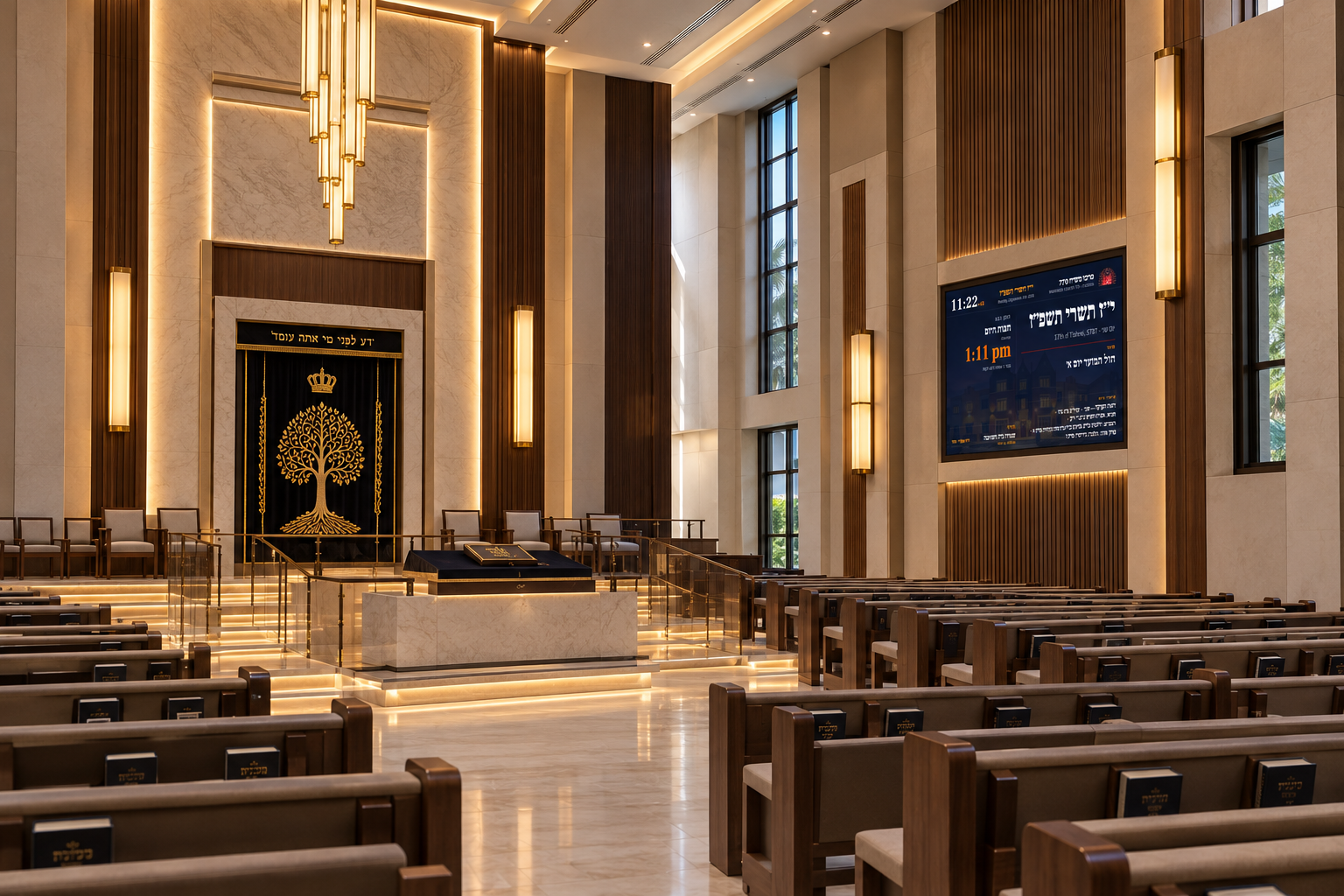
על הקיר, בלאודרהיל

On the wall, in Lauderhill

בית הכנסת הראשון שהתקין את הלוח. אלו צילומים של המסך התלוי שם, כפי שהוא נראה באמצע יום חול רגיל — לא הדמיה ולא צילום מסך.

The first shul to put the board up. These are photographs of the screen hanging there, in the middle of an ordinary weekday — not a mock-up and not a screenshot.

The Luach Chai board mounted on the wall at Moshiach Center 770 in Lauderhill, Florida, showing the Hebrew date, the next zman and the days remaining until Rosh Hashana.
מרכז משיח 770 · לאודרהיל, פלורידה Moshiach Center 770 · Lauderhill, Florida
The same board a minute later, showing the Chitas and Rambam screen: chumash, tehillim, Tanya, Rambam and Daf Yomi for the day.
אותו מסך, דקה אחר כך The same screen, a minute later
מרכז משיח 770 Moshiach Center 770
Lauderhill, Florida

הלוח תלוי שם ורץ מעצמו. אף אחד לא נוגע בו ביום־יום: התאריך העברי, הזמנים, חת״ת ורמב״ם והמסכים המתחלפים — הכול נקבע מהיום שבו הוא נמצא.

It hangs there and runs itself. Nobody touches it day to day — the Hebrew date, the zmanim, Chitas and Rambam and the screens changing over all follow from the day it is.

1מסך אחד על הקירone screen on the wall
0תחזוקה יומית — מה שאתם כותבים נשאר שלכםdaily upkeep — what you write is still yours to write
24/7דולק, כולל אחרי הפסקת חשמלon, including after a power cut
★★★★★
הגבאי לא צריך לגעת במסך. פעם היינו מדפיסים דף חדש כל שבוע ותמיד היה משהו לא מעודכן — זמן שהשתנה, יארצייט ששכחנו. עכשיו זה פשוט נכון, כל יום, לבד.
The gabbai does not have to touch the screen. We used to print a new sheet every week and something was always out of date — a time that had changed, a yahrzeit we forgot. Now it is simply right, every day, by itself.
Itamar T. גבאי · מרכז משיח 770, לאודרהיל Gabbai · Moshiach Center 770, Lauderhill

הלוח, ברגע זה

The board, right now

זה לא צילום מסך. זה לוח אמיתי שרץ עכשיו — התאריך העברי של היום, הזמנים של היום, והמסכים מתחלפים לבד בדיוק כמו על קיר בבית הכנסת.

This is not a screenshot. It is a real board running right now — today's Hebrew date, today's zmanim, and the screens changing by themselves exactly as they would on a shul's wall.

קהילת אור החיים היא בית כנסת לדוגמה. כל שם על הלוח הזה מומצא. Ohr HaChaim Congregation is a sample shul. Every name on this board is invented.

ומה שרק אתם יודעים — אתם כותבים

And what only you know, you write

הלוח מתחזק את עצמו, אבל הוא לא נעול. השיעורים, ההודעות, האירועים וזמני המניינים של בית הכנסת שלכם נכתבים על ידכם — מכל מקום ומכל מכשיר, בעברית או באנגלית, בלי להתקין כלום.

The board keeps itself current, but it is not locked. Your shiurim, your announcements, your events and your minyan times are yours to write — from anywhere, on any device, in Hebrew or English, with nothing to install.

  • זמני מנייניםMinyan times לכל יום, ולשבת בנפרד. אפשר גם „20 דקות לפני הדלקת נרות״. Per weekday, and Shabbos separately. Or "20 minutes before candle lighting".
  • שיעוריםShiurim שם, ימים, שעה — ומקום, אם יש יותר מחדר אחד. Name, days, time — and where, if you have more than one room.
  • הודעותAnnouncements עם תאריך סיום, כך שהודעה ישנה יורדת מעצמה. With an end date, so an old one takes itself down.
  • אירועים ופלייריםEvents and flyers אירוע שהתחיל נעלם מהמסך לבד. An event that has started disappears on its own.
  • שינויים לתאריךOne-off changes שבת אחת עם לוח זמנים אחר, בלי לשנות את הקבוע. One Shabbos with a different schedule, without touching the regular one.

מהטלפון בבית הכנסת, מהמחשב בבית, או מהדרך — הניהול הוא דף אינטרנט רגיל עם סיסמה. אין אפליקציה להתקין, והשינוי מופיע על המסך תוך דקה. From your phone in the shul, your computer at home, or on the way — the admin is an ordinary web page with a password. There is no app to install, and the change is on the wall within a minute.

סבבScreens תפילותDavening שיעוריםShiurim הגדרותSettings בדיקהPreview
סבב מסכים
Screens and rotation
מסך ראשיMain screen10
שבת ומועדיםShabbos & Yom Tov14
זמני היוםZmanim10
תורמיםDonors10
שמירהSave
סבבScreens תפילותDavening שיעוריםShiurim הגדרותSettings בדיקהPreview
זמני תפילות
Davening times
שם התפילהNameמנחה ערב שבת
שעהTimecandles-20
ימיםDays
אבגדהוש
שמירהSave
סבבScreens תפילותDavening שיעוריםShiurim הגדרותSettings בדיקהPreview
שיעורים
Shiurim
שם השיעורNameשיעור בגמרא
שעה / מתיTime / when20:30
מקוםWhereבית המדרש
שמירהSave
סבבScreens תפילותDavening שיעוריםShiurim הגדרותSettings בדיקהPreview
הגדרות בית הכנסת
Shul settings
מיקוםWhere the shul isLauderhill, FL 33319
קו רוחב · קו אורךLatitude · longitude26.1848 · −80.2406
הדלקת נרות (דקות)Candle lighting (mins)18
נוסחNusachחב״ד ▾
שמירהSave
סבבScreens תפילותDavening שיעוריםShiurim הגדרותSettings בדיקהPreview
תצוגת בדיקה
Preview any date

בחרו תאריך והלוח ייפתח כאילו היום הוא אותו יום.

Pick a date and the board opens as if today were that day.

30י״ז30י״ח1י״ט2כ׳3כ״א4כ״ב5כ״ג6כ״ד7כ״ה8כ״ו9כ״ז10כ״ח11כ״ט12א׳

שבת ומועדים

Shabbos and Yom Tov

מסך שמופיע מעצמו בשבת ובכל יום טוב — ברכה, פסוק, והציור של אותו חג. ארבעה מהם כאן, חיים: אלה לוחות אמיתיים, כל אחד מוצג ביום שלו.

A screen that comes up by itself on Shabbos and every Yom Tov — a greeting, a posuk and that festival's own artwork. Four of them here, live: real boards, each set to its own day.

שבת קודש
Shabbos
ראש השנה
Rosh Hashana
סוכות
Sukkos
חנוכה
Chanukah

הציורים הם של הלוח עצמו, וזה מה שבית כנסת רואה ביום הראשון. אפשר להעליף כל אחד מהם בתמונה אמיתית משלכם דרך עמוד הניהול.

The artwork is the board's own, and it is what a shul sees on day one. Any of it can be replaced with a photograph of your own from the admin page.

הזמנים לפי השיטה שלכם

Zmanim by your shita

בחירה אחת בעמוד הניהול משנה את כל הלוח — לא רק את הכותרות.

One choice in the admin changes the whole board — not just the headings.

  • חב״דChabad זמנים לפי בעל התניא, הפטרות לפי ספר המנהגים, חת״ת ורמב״ם, היום יום ותניא, ותאריכי חב״ד Baal HaTanya zmanim, Sefer HaMinhagim haftaros, Chitas and Rambam, Hayom Yom and Tanya, and the Chabad dates
  • אשכנזAshkenaz זמנים לפי הגר״א עם ק״ש מג״א, הפטרות נוסח אשכנז, דף היומי Gr"a zmanim with the Magen Avraham Shema, Ashkenazi haftaros, Daf Yomi
  • ספרדSefard כנ״ל, לפי לוח בית הכנסתAs above, following your shul's luach
  • עדות המזרחEdot HaMizrach כנ״לAs above

עברית ואנגלית

Hebrew and English

אתם בוחרים איזו שפה גדולה ואיזו מתחתיה — או שפה אחת בלבד.

You choose which language leads and which sits beneath it — or just one.

  • עברית בלבדHebrew only לוח בעברית, מימין לשמאלRight to left throughout
  • עברית ואנגליתHebrew first עברית גדולה, אנגלית מתחתיהHebrew large, English beneath it
  • אנגלית ועבריתEnglish first אנגלית גדולה, עברית מתחתיה — הלוח מתהפך לשמאל־ימין English large, Hebrew beneath — the whole board flips to left-to-right
  • אנגלית בלבדEnglish only לקהילה דוברת אנגליתFor an English-speaking community

איך זה עובד

How it works

אין תוכנה להתקין ואין שרת לתחזק — זה עלינו. מסך, מקל סטרימינג קטן, וזהו.

No software to install and no server to look after — that part is ours. A screen, a small streaming stick, and that's it.

1

תולים מסך

Hang a screen

כל טלוויזיה עם HDMI. מחברים מקל סטרימינג קטן ופותחים את הכתובת של בית הכנסת.

Any TV with HDMI. Plug in a streaming stick and open your shul's address.

2

ממלאים את הפרטים

Fill in your details

זמני תפילות, שיעורים, רשימת הקהילה. אנחנו מייבאים לכם את הרשימות מאקסל.

Davening times, shiurim, your community list. We import your lists from Excel for you.

3

הלוח מתחזק את עצמו

The board keeps itself current

כל מה שנובע מהתאריך — זמנים, פרשה, שיעורים, יארצייטים — מתעדכן לבד. אתם מזינים רק את מה שרק אתם יודעים: זמני מניינים, הודעות, אירועים. שינוי מהטלפון מופיע על המסך תוך דקה.

Everything that follows from the date — zmanim, parsha, learning, yahrzeits — keeps itself current. You enter only what only you know: minyan times, announcements, events. A change from your phone shows within a minute.

אפשר גם בלי אינטרנט

It can run with no internet

הלוח לא שולף כלום מהענן. הזמנים, התאריך העברי, ההפטרות, חת״ת ורמב״ם, היום יום ושיעור תניא — הכול מחושב על המקום.

The board pulls nothing from a cloud. The zmanim, the Hebrew date, the haftaros, Chitas and Rambam, Hayom Yom and the daily Tanya are all worked out on the spot.

לבית כנסת שמעדיף ששמות הקהילה לא ייצאו מהבניין — אנחנו מתקינים את הלוח בתוך בית הכנסת. אתם עדיין מנהלים אותו מהטלפון, בדיוק אותו דבר.

For a shul that would rather its community's names never left the building, we install it inside the shul instead. You still run it from your phone, exactly the same.

מותקן בבית הכנסת — האינטרנט לא נדרש כלל
Installed in the shul — the internet is not needed at all
שמות הקהילה לא עוזבים את הבניין
Your community's names never leave the building
אנחנו מביאים את הציוד מוכן ומתקינים
We bring the equipment ready and set it up
העדכונים והתחזוקה עלינו
Updates and upkeep are ours

מחירים

Pricing

מחיר אחד לכל בית כנסת, בלי מדרגות ובלי תוספות לפי מספר חברים.

One price per shul. No tiers, no charging by the number of members.

התקנהSetup
$180
חד־פעמיone-time
  • הגדרת בית הכנסתYour shul configured
  • ייבוא רשימת הקהילהCommunity list imported
  • ליווי בהתקנה על המסךHelp getting it on the screen
מנוי חודשיMonthly
$49
לחודשper month
  • כל המסכיםEvery screen
  • עדכונים ותיקונים כלוליםUpdates and fixes included
  • ביטול בכל חודשCancel any month
מנוי שנתיYearly
$490
לשנה — חודשיים מתנהper year — two months free
  • הכול כמו במנוי החודשיEverything in the monthly plan
  • חיסכון של $98Saves $98
  • תמיכה בעדיפותPriority support

חומרה לפי עלות — מקל סטרימינג בסביבות $50, או שתשתמשו במה שכבר יש לכם.

Hardware at cost — a streaming stick is around $50, or use what you already have.